
If you’re a CPA evaluating a custom bookkeeping system vs QuickBooks for a founder, the answer isn’t obvious, and it’s not a knock on either one. QuickBooks and LedgerDesk serve different founders at different stages of business maturity. Recommending the wrong system wastes everyone’s time.
Before you decide, though, understand what the security model differences actually mean for your client’s risk profile.
Here’s how to tell them apart, and which founder gets which.
Both are legitimate. They’re just built for opposite problems.
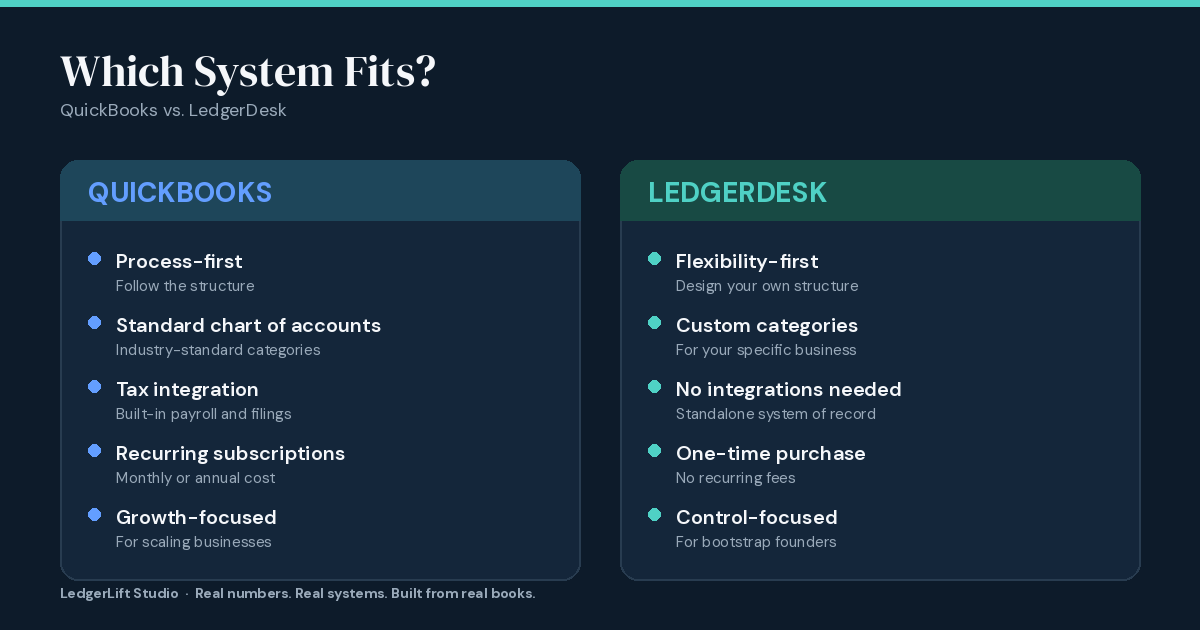
QuickBooks Online is process-first software. It enforces a standardized chart of accounts, tax categories, and recurring workflows. It’s built for businesses that are ready to “do bookkeeping right” — follow the structure, and the software handles tax prep, payroll integration, and compliance layers.
LedgerDesk is flexibility-first. It’s a customizable database built for founders who have non-standard income, irregular expenses, or a business model that doesn’t fit QuickBooks’ preset categories. There’s no enforced process. The founder controls the structure.
Neither approach is wrong. They solve different problems for different founders at different stages.
The founder who belongs in QuickBooks
Your client should land in QuickBooks if:
- They have stable, recurring revenue (W-2 employees, regular client billing, subscription income)
- They’re willing to adopt a standardized chart of accounts
- They want their bookkeeper to work inside the same software as their accountant
- Long-term plan includes payroll, tax automation, or integration with other tools (loans, credit cards, etc.)
- They’re OK with a monthly subscription fee ($15–$100+/month depending on features)
QuickBooks is the industry standard for a reason. When a founder is ready to professionalize their financials, QuickBooks is often the right move.
The founder who belongs in LedgerDesk
Your client should land in LedgerDesk if:
- They have non-standard income (multiple revenue streams, project-based work, weird client payment structures)
- They want custom expense categories their business actually uses, not the tax form
- They want to own the system outright (one-time payment, no monthly recurring cost)
- They don’t need payroll integration or tax automation built into the system itself
- They value privacy and data control (everything lives on their computer or their account, not a third-party cloud by default)
- They’re skeptical of subscriptions or want to minimize recurring costs
LedgerDesk buyers are often bootstrap founders who’ve outgrown spreadsheets but aren’t ready for the overhead and cost of traditional accounting software.
The honest trade-off: process vs. flexibility
If you had to pick the real difference, it’s this:
QuickBooks trades flexibility for process. It tells you how to organize your books. That’s useful if you want to follow best practices. It’s friction if your business doesn’t fit the template.
LedgerDesk trades process for flexibility. You design the structure around your business, not the other way around. That’s useful if you’re non-standard. It’s overhead if you just want to follow the rules.
A founder in QuickBooks gets support and structure. A founder in LedgerDesk gets control and customization.
How a CPA uses this comparison to make the right referral
When you’re weighing a custom bookkeeping system vs QuickBooks for a specific founder, before you recommend either one, ask your client three questions:
1. What does your revenue actually look like?
- If it’s one repeating client or standard employee salaries → QuickBooks
- If it’s project-based, multiple income streams, or irregular → LedgerDesk
2. Do you want to professionalize toward tax automation, or stay lean?
- If they’re hiring, planning to scale, want tax/payroll built-in → QuickBooks
- If they want to keep costs down and stay simple → LedgerDesk
3. Are you willing to adopt an industry-standard chart of accounts?
- If yes → QuickBooks
- If “I need my own categories for my business” → LedgerDesk
Answer one “LedgerDesk” to any of those three, and your client probably belongs in LedgerDesk, not QuickBooks.
LedgerDesk isn’t a stepping stone to QuickBooks
One thing worth being explicit about: recommending LedgerDesk isn’t a temporary fix before moving to QuickBooks later. Some founders use LedgerDesk for years and never need to switch. Others do eventually move to QuickBooks — but that’s a separate decision, not the goal from day one.
If a founder is in LedgerDesk because their business is non-standard, their business probably stays non-standard. That’s fine. That’s who LedgerDesk is built for. Once you’ve settled on fit, the last vetting question is whether that system creates an ongoing maintenance burden down the line.
Where this fits in your referral process
Most CPAs encounter this decision at the point where a founder’s books are already a mess. They’ve been in spreadsheets too long, and something has to change.
If the books are messy and the founder needs structure before anything else, what a bookkeeping reset actually is is often the on-ramp — get the data clean first, then choose the system once you can actually see what you’re working with.
If the books are already reasonably organized (or after a reset), or if the founder just needs a system going forward, the diagnostic tool takes about 10 minutes and shows whether LedgerDesk Solo fits their profile or whether QuickBooks is the better call.
Either way, the decision tree is the same: non-standard business structure and revenue model → LedgerDesk. Standard business structure and growth ambitions → QuickBooks.
The thing CPAs appreciate about LedgerDesk
One last thing: if you refer a client to LedgerDesk and then need to work inside it to reconcile or review their books, you have full read access to everything. No login limits, no per-user fees, no “I can only add so many users” friction. The founder controls access, and you get what the founder gives you.
That’s different from software-as-a-service, where your access is often a separate line item or managed through seat-based licensing. With LedgerDesk, access is straightforward: founder owns it, founder shares it with you if needed.
Real numbers. Real systems. Built from real books.