
If you’re a CPA who’s been asked to vet a custom financial database before referring a client to it, the question isn’t whether it looks organized. It’s whether it’s actually safe to put client financial data in.
That’s a fair question. Here’s a direct answer.
What “custom financial database” actually means here
LedgerLift Studio builds custom financial database systems on Airtable or Microsoft Access. Neither is a proprietary LedgerLift platform. Neither is a black box. The system itself is a structured build: tables, relationships, formulas, and views built around how a specific business actually runs its books. What changes from client to client is the structure. What doesn’t change is the underlying platform’s security model. Airtable or Microsoft controls that — not LedgerLift.
That distinction matters for a security review. You’re not evaluating an unknown startup’s homegrown app. You’re evaluating a structured build on top of an established platform. That platform has its own security infrastructure. LedgerLift adds structure on top — not a new hosting layer underneath.
Access controls
LedgerLift hands over every LedgerDesk system with founder-level ownership. The founder controls who has access, at what permission level, and can revoke it at any time — the same as they would with any file or account they own outright. There’s no shared master login. There’s no LedgerLift-side account that keeps access after handover. Once a system is delivered, it belongs to the founder, fully and exclusively.
A CPA who needs read access to reconcile or file gets it directly from the founder, through the platform’s own permission settings — the same mechanism you’d use to share a QuickBooks or Xero login, scoped to what’s actually needed.
Where the data lives — and why this isn’t the same answer for both platforms
This is the part worth being precise about. Airtable and Access aren’t the same kind of platform. Treating them as interchangeable would undersell what’s actually true.
Airtable-based systems: hosted, certified, encrypted
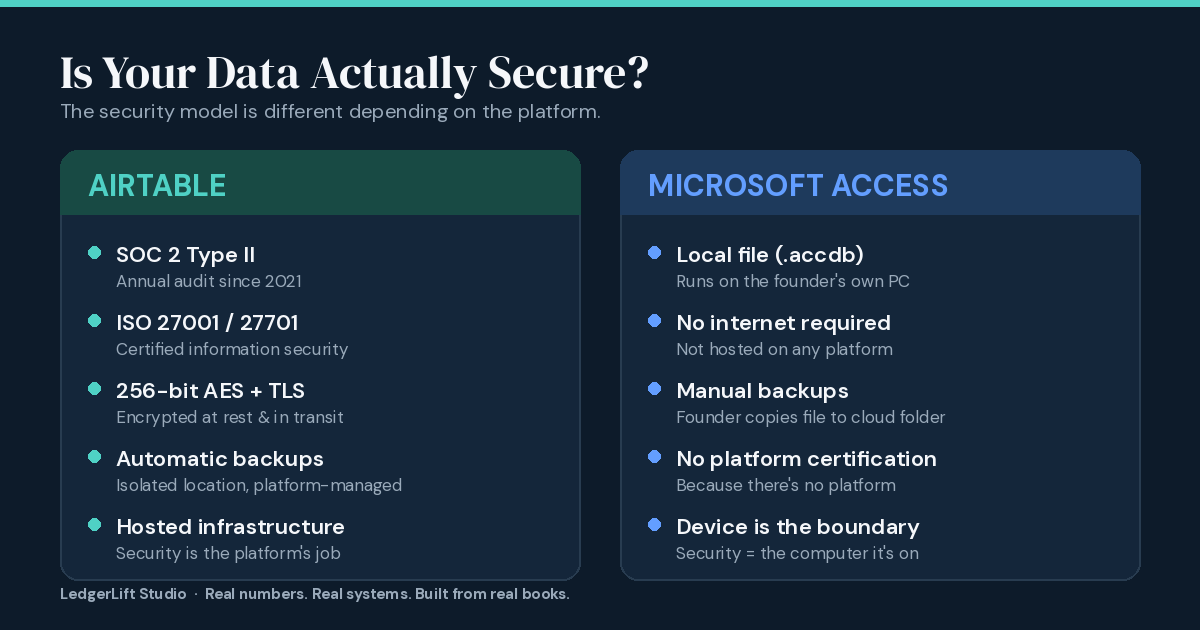
Airtable-based LedgerDesk systems run on Airtable’s hosted infrastructure. Airtable holds SOC 2 Type II certification, audited annually since 2021. It also holds ISO 27001 and ISO 27701 certification. Airtable encrypts data with 256-bit AES at rest and 256-bit TLS in transit. Backups run automatically to a separate, isolated location. Founders can export their own data as CSV or via the API at any time. This is the kind of platform-level security a CPA would expect from any established SaaS product. LedgerLift doesn’t add a separate hosting layer on top — it doesn’t need to.
Access-based systems: local, offline, device-dependent
Access-based LedgerDesk systems work differently, and this matters. A LedgerDesk Access build is a local .accdb file. It runs on the founder’s own Windows computer. It needs no internet connection. There’s no cloud hosting involved by default. Founders save the file to a permanent folder on their machine — not Downloads, not Desktop — and keep a backup copy in a cloud folder like OneDrive, Google Drive, or Dropbox. That backup copy is disaster-recovery insurance. It’s not where the working file lives day to day.
So the honest answer to “is Access secure” is this: it’s exactly as secure as the computer it’s on. There’s no platform-level encryption or access-control layer to point to, because there’s no platform. The founder’s login password, whether their disk is encrypted, and who has physical access to that machine — that is the security boundary. LedgerLift isn’t hiding this. It’s the nature of a local desktop file, and it’s true of any Access-based system, regardless of who builds it.
For a CPA vetting this on a client’s behalf, the practical takeaway is simple: ask whether the client’s machine itself is reasonably secured. A password-protected login matters. A shared family computer with no separate accounts doesn’t cut it. That question matters more than anything about the database file itself.
Version history and backups
Airtable handles version history and backup automatically at the platform level. Founders don’t have to think about it. CSV or full-base export is available anytime as an additional layer.
Access is manual. The setup process walks founders through copying the file, renaming it with a date, and storing that copy in a cloud folder. It works, and it’s a five-minute habit — but the founder has to actually do it. The platform doesn’t handle it in the background. If a CPA is relying on a client’s Access-based system for anything time-sensitive, it’s worth confirming that backup habit is actually happening, not just that it’s possible.
What this replaces
The honest comparison isn’t a custom database against enterprise accounting software. It’s a custom database against what most bootstrap founders are actually using before they build one: a spreadsheet passed around by email, a shared Google Sheet with no access log, or a QuickBooks file nobody’s reconciled since Q1. Against that baseline, a structured system with defined access levels and a single source of truth is a meaningful upgrade — regardless of platform. For Airtable builds specifically, platform-level security adds another layer on top of that.
Is a custom database secure for financial data? The checklist a CPA should actually use
- Who currently has access to the base or database, and at what permission level
- Whether the founder can independently manage access (they should be able to — it’s their system)
- What the export/backup process looks like if the relationship with the builder ends
- Whether sensitive fields — bank details, SSNs if present — sit in plain fields or carry appropriate restriction
These are reasonable questions. A founder who’s had their system built by LedgerLift should answer all four without hesitation, because the system was built for them to own — not to depend on LedgerLift to operate.
Where this fits in the process
Security review usually comes up for one of two reasons. Either a client’s books are already a mess and a CPA is trying to figure out if a cleanup-and-rebuild is safe to recommend, or a client already has a LedgerDesk system and the CPA needs to work inside it.
For the first case — messy books that need structure before anything else — what a bookkeeping reset actually is explains the on-ramp. It gets the books clean and organized as the foundation for a system, not as a standalone fix. It’s preparation, not the destination.
For the second case — a client who already has a system built — LedgerDesk Solo is the most common build a CPA will encounter. It’s worth understanding what the founder actually owns once delivery is complete: full access control, no LedgerLift-side login, and the platform’s native backup and export tools. If a client hasn’t been through this process yet, the diagnostic tool takes about 10 minutes and identifies which product actually fits their current books — no guessing from the outside required.
Either way, the security question has a straightforward answer, even if it’s not identical for both platforms. For Airtable builds, the platform sets a strong baseline, and LedgerLift doesn’t add a layer of access outside the founder’s control. For Access builds, the founder’s own device is the baseline — worth confirming directly, not assuming. In both cases, the founder owns the system outright from the moment it’s delivered.
But security is only part of the decision. Before recommending either system, also consider when to choose LedgerDesk instead of QuickBooks based on your client’s revenue model and structure — and whether the system will need ongoing maintenance once it’s built.
Real numbers. Real systems. Built from real books.